Reseller API Reference
1. Offer stage
1.1 Trip search
Trip search is not implemented through OSDM, but in timetables from a separate offline import/export.
1.2 Timetable
- This manual does not cover the import/export of timetables.
- Swedish x_swe station encoding
- Do not use UIC for station encoding
- Syntax: urn:x_swe:stn:nnnnnnnnn, where nnnnnnnnn is the national swedish nine digit code for “hållplatser”
- carrier code urn:x_swe:carrier:xx, where xx is the national swedish carrier code.
- SJ service brand codes/names (ProductCategoryRef) ST (Snabbtåg), RE (Regional), IC (InterCity), NT (Nattåg), EN (EuroNight), RB (Ersättningsbuss)
1.3 Offer search
- TripSpecification.externalRef is optional.
- Multiple legs in a booking must not have the same leg externalRef.
- Fully booked trains returns empty offers
- Cancelled trains return empty offers
- Not yet released trains return empty offers
- SJ does not expose seat availability in the offer response. The caller must separately call GET /availabilities/preferences to get them
- The offer summary is based on the main leg. Even if the main leg has the correct service class, travel class etc., some child legs might have a different fallback configuration if it cannot be matched exactly to the overall. For example, a 1class journey with a connecting train that does not have any 1class seats, in which case that leg will fall back to 2 class and hence will not match the offer summary.
- Max offers size: 9 passengers, six trips, 3 segments in a row
- SJ do not currently have any products with optional reservations. Either a product has mandatory reservations or no reservations at all.
- SJ returns a human-readable and localized description of the product in product.summary. SJ does not use product.description, it always contains an empty string. Once the upcoming OSDM version containing product.name property is in place, SJ will utilize that instead of summary. Example:
"products": [
  {
    "id": "JREF_2_H",
    "code": "JREF_2_H",
    "summary": "2 klass, Kan återbetalas",
"description": "",- Offermode individual/collective: Individual is the default case, where every passenger has their own separate offer parts with separate prices. With collective offermode you get a single price for all passengers, and you cannot refund passengers separately.
- International trip - If a journey crosses an international border, set the flag tripSpecifications.isPartOfInternationalTrip: true, otherwise false.
- International trips have the CIV code in the offer response.
- Resplus flag - not used in offer stage, only when creating the booking.
1.4 Night Trains
- private/share compartment
- 1 class sleeper is always private
- Seats are always shared
- ReservationOfferPart.numberOfPrivateCompartments is effectively treated by SJ as a Boolean flag:
- A reservation in a shared compartment has numberOfPrivateCompartments=1.
- A reservation in a private compartment has numberOfPrivateCompartments=0.
- You cannot determine how many private compartments there are in total in the booking.
- Available night train products
- 1 class sleeper
- 1 passenger
- 2 passengers sharing a compartment
- 2 passengers having one private compartment each
- 2 class sleeper
- Bed in sleeping compartment
- Private sleeping compartment
- 2 class couchette
- Berth in couchette
- Private couchette (needs at least two passengers)
- Seat
- 1 class sleeper
- Offers for two passengers in 2 class night train:
- Offer for 2 class sleeper, private compartment
- Admission passenger 1
- Reservation passenger 1, numberOfPrivateCompartments=1 => private compartment
- Admission passenger 2
- Reservation passenger 2, numberOfPrivateCompartments=1 => private compartment
- Admission passenger 1
- Offer for 2 class sleeper, shared compartment
- Admission passenger 1
- Reservation passenger 1, numberOfPrivateCompartments=0 => bed in compartment
- Admission passenger 2
- Reservation passenger 2, numberOfPrivateCompartments=0 => bed in compartment
- Admission passenger 1
- Offer for 2 class couchette, private compartment
- Admission passenger 1
- Reservation passenger 1, numberOfPrivateCompartments=1 => private compartment
- Admission passenger 2
- Reservation passenger 2, numberOfPrivateCompartments=1 => private compartment
- Admission passenger 1
- Offer for 2 class couchette, shared compartment
- Admission passenger 1
- Reservation passenger 1, numberOfPrivateCompartments=0 => bed in compartment
- Admission passenger 2
- Reservation passenger 2, numberOfPrivateCompartments=0 => bed in compartment
- Admission passenger 1
- Offer for 2 class seat
- Admission passenger 1
- Reservation passenger 1
- Admission passenger 2
- Reservation passenger 2
- Admission passenger 1
- Offer for 2 class sleeper, private compartment
- It is not possible in 2 class to book two passengers and have each passenger in their own separate private compartment. It is however possible in 1 class. Example: book 8 passenger with private compartments – they will be distributed in three private compartments 3-3-2.
- Offers for two passengers in 1 class night train:
- Offer for 1 class sleeper (This one is for the two passengers to share a private compartment)
- Admission passenger 1
- Reservation passenger 1, numberOfPrivateCompartments=1 => private compartment
- Product.id JREFAP_N
- Admission passenger 2
- Reservation passenger 2, numberOfPrivateCompartments=1 => private compartment
- Product.id JREFAP_N
- Admission passenger 1
- Offer for 1 class sleeper (Two passenger have one private compartment each)
- Admission passenger 1
- Reservation passenger 1, numberOfPrivateCompartments=1 => private compartment
- Product.id JREFAP2_N
- Admission passenger 2
- Reservation passenger 2, numberOfPrivateCompartments=1 => private compartment
- Product.id JREFAP2_N
- Admission passenger 1
- Offer for 1 class sleeper (This one is for the two passengers to share a private compartment)
- It is not possible to use maxGroupItemsToBeBooked/minGroupItemsToBeBooked to determine the number of passengers that can be booked in an entire compartment, since SJ will return one reservationOfferPart per passenger.
- If you select a shared compartment, you must also specify one of the place properties MEN/LADIES/MIXED as a place selection, otherwise you will get an error (MIXED only works for couchettes, not sleepers). This must be done in the POST /booking call when creating the provisional booking and cannot be patched in later. SJ will not automatically select compartment gender based on the passenger’s gender, since we do not utilize that property at all.
- Empty shared compartments do not have any pre-assigned gender. Compartments are randomly assigned the gender selection of the first passenger that is placed in it. This means that it is not possible to determine how many each of MEN/LADIES/MIXED compartments that are available through GET /availabilities call for a night train with empty compartments.
- Lower/middle/upper beds are place properties and can be selected as such (see place properties)
- Pet compartment is a place property.
- It is possible to book both private and shared compartments with animals.
- Wheelchair compartments can only be booked though SJ Customer Service.
- Euronight trains have separate age restrictions from other night trains.
1.5 Get Availabilities
- GET /availabilities can be called both in an offer context and a booking context.
- In both cases, there is no guarantee for the returned availability. The last seats might be taken between calling GET /availabilities and selecting a seat.
- The Reseller API will show numeric availability for each unique combination of place properties within the selected offer/booking. This gives the physical availability and can be “reasoned with” by the client/distributor, eg aggregating per property if wanted (“a total of XX Window seats).
- GET /availabilities/nearby is not supported
2. Booking stage
2.1 Booking
- The Reseller API requires bookingrequest.externalRef to be set to a unique booking reference in the caller’s system.
- Booking.bookingCode is always set to the same value as booking.id
- Change booking information
- Place selection (see separate)
- Passenger information (see separate)
- Purchaser (see separate)
- Add or remove passengers not allowed.
- Payment methods to pay with voucher.
- Multiple passengers always have separate admissions and reservations.
- There is always one bookedOffer per booking
- bookedoffer endpoints not supported
- return trips in separate booking
- confirmedPrice and provisionalPrice are always present regardless of booking status. Sometimes with value 0.
- Default TTL for provisional bookings is 60 minutes
- Bookings will contain a list of static attributes for each service. (Service properties in S3)
- Each SJ product has a default payment method, which means that the payment method does not have to be explicitly specified.
- Patching bookings with paymentMethods is additive, means “append these methods to the ones already in the booking”[DE1] [CS2]
- There will be a price amount on booking level (booking.provisionalPrice, booking.confirmedPrice) as well as on the bookingpart level (admission.price, ancillary.price).
- Having a reservation does not automatically imply that you also have a specific seat reserved, it only means that you are guaranteed any seat in general on the train, that the train won’t be overbooked. Only if the reservation also includes a placeAllocation, you are allocated a specific seat number. This means that there are three different variants: 1. Ticket without reservation, 2. Ticket with reservation but without placeAllocation, 3. Ticket with reservation and placeAllocation
- Resplus flag: If the journey is part of a resplus journey, set the flag OfferSelection.throughTicketTags: “RESPLUS”. The same flag will be returned in BookedOffer.appliedThroughTicketTags
- Return trips should always be booked as two separate bookings, one for the outbound trip and another for the inbound trip.
- Some products for regional trains have a reservation bookingPart that does not contain any placeAllocation. That means that the passenger gets guaranteed a seat on the train, just not any specific seat.
2.2 Additional booked-offers / shopping cart not supported
The Reseller API does not allow adding new offers to an existing booking.
2.3 Additional-offers endpoint not supported
The additional-offers endpoint is not supported.
2.4 Passenger
- Required passenger properties: firstName, lastName
- Passenger email and phoneNumber are not required properties but strongly advised to use. The reason is that these are used to communicate directly with the passenger during a traffic disturbance.
- Passenger properties that are not used by SJ and will be ignored if present in a request:
- Gender
- DateOfBirth
- PersonDetail.address
- There are separate rules for passenger properties when using and purchasing travel passes. (See separate sections for those)
- Age is optional, and if omitted the passenger type automatically becomes PERSON
- It is possible to create a provisional booking with incomplete passenger properties and patch them in later, before confirming. You will get a warning when creating the booking though.
- Once you patch passenger details, the details in patch must be complete.
- It is allowed to change age through patching, upon which the price will be recalculated, but this should be avoided.[DE1] [CS2]
- It is not allowed to update passenger information after having confirmed a booking.
- It is not allowed to add or remove passengers from a booking. You must create a new booking instead.
- Passengers shall be referenced by passenger.externalRef in the offer stage, and by passenger.id from the booking stage and onwards. So, a POST /booking will use the externalRef, but a PATCH /passenger will use the id.
- It is not possible to remove cards from a passenger through patching. Only add or change. Trying to remove will cause an error.
2.5 Getting discount for different passenger types (child, student, senior etc)
- According to SWE rules, it is not up to the client to specify the passenger type. Since the Swedish operators differs a lot in their definitions of the different types, it would be too complicated for a client to keep track of the proper rules for each operator.
- Instead, the client only supplies 1) the age of the passenger, 2) if the passenger should have pensioner discount and 3) if the passenger should have student discount. From these three, each operator will determine its own operator-specific passenger type.
- Passenger pensioner discount is expressed by the client using a reduction card, but in reality this is not an actual card but merely acts as a flag, or a placeholder for the real discount card.
"cards": [
  {
    "code": "SWE_PENSIONER",
    "type": "REDUCTION_CARD"
  }
]- Note that there should not be any issuer or number, since this is not an actual card.
- Student discount uses the same setup as pensioner, but with a different code:
"cards": [
  {
    "code": "SWE_STUDENT",
    "type": "REDUCTION_CARD"
  }
]- The OSDM field anonymousPassenger/passenger.type should not be used. It must always be set to PERSON.
- Feedback to the client on which operator-specific passenger type that was determined is in admissionOfferPart/admission.appliedPassengerTypes, which contains both the type code and a localized description of the type.
- Since there is no STUDENT osdm passenger type, these passengers will have appliedPassengerType=PERSON although being students internally in S3.
- Table of how SJ maps age and reduction cards to passenger types:
| OSDM Request Passenger age | OSDM Request Reduction Card | Resulting S3 internal passenger type | SJ OSDM response appliedPassengerType |
|---|---|---|---|
| 1. Passenger with only age specified | |||
| 0-6 | none | CHILD_0_6 | CHILD |
| 7-15 | none | CHILD_7_15 | CHILD |
| 16-19 | none | YOUTH_16_19 | YOUTH |
| 20-25 | none | YOUTH_20_25 | YOUTH |
| 26-64 | none | ADULT | PERSON |
| 65 => | none | SENIOR | SENIOR |
| 2. Passenger with a SWE_STUDENT card and different ages | |||
| 0-6 | SWE_STUDENT | CHILD_0_6 | CHILD |
| 7-15 | SWE_STUDENT | CHILD_7_15 | CHILD |
| 16-19 | SWE_STUDENT | STUDENT | PERSON |
| 20-25 | SWE_STUDENT | STUDENT | PERSON |
| 26-64 | SWE_STUDENT | STUDENT | PERSON |
| 65 -> | SWE_STUDENT | SENIOR | SENIOR |
| 3. Passenger with a SWE_PENSIONER card and different ages | |||
| 0-6 | SWE_PENSIONER | CHILD_0_6 | CHILD |
| 7-15 | SWE_PENSIONER | CHILD_7_15 | CHILD |
| 16-19 | SWE_PENSIONER | SENIOR | SENIOR |
| 20-25 | SWE_PENSIONER | SENIOR | SENIOR |
| 26-64 | SWE_PENSIONER | SENIOR | SENIOR |
| 65 -> | SWE_PENSIONER | SENIOR | SENIOR |
2.6 Purchaser /Customer
- Required purchaser properties
- firstName
- lastName
- phoneNumber
- Purchaser.detail.address.id must be a valid URN
- It is possible to create a provisional booking without any customer property at all and then add in a patch /purchaser call. That patch must have complete customer details.
- It is possible to patch purchaser details after confirming the booking, but it should be avoided.
3. Functionality
3.1 Products
- Accommodation subtype is not used in Sweden, it should always be set to ANY_SEAT
- The diamond
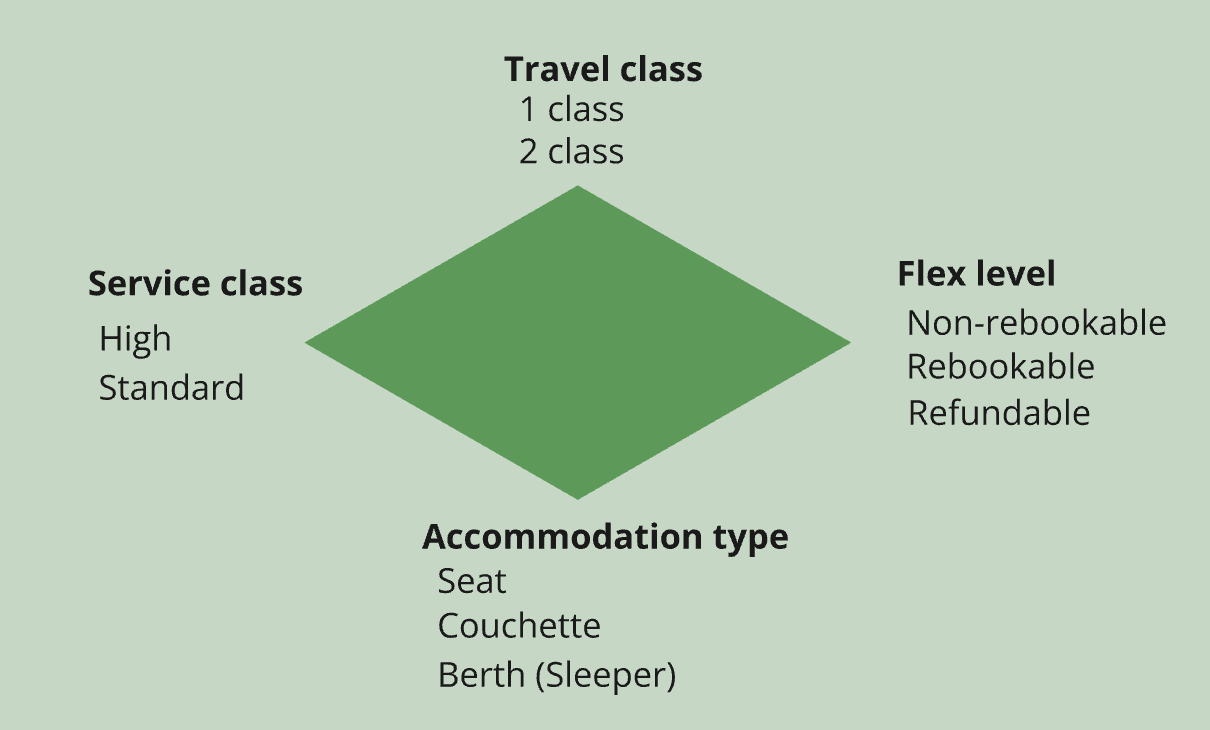
| Product | Travel Class | Service Class | Accommodation type | Private/Shared |
|---|---|---|---|---|
| SJ Day Trains | ||||
| 2 class standard seat | SECOND | STANDARD | SEAT | - |
| 2 class calm | SECOND | HIGH | SEAT | - |
| 1 class standard seat | FIRST | STANDARD | SEAT | - |
| SJ Night Trains | ||||
| 2 class standard seat | SECOND | STANDARD | SEAT | - |
| Private 2 class couchette | SECOND | STANDARD | COUCHETTE | PRIVATE |
| Shared 2 class couchette | SECOND | STANDARD | COUCHETTE | SHARED |
| Private 2 class sleeper | SECOND | HIGH | BERTH | PRIVATE |
| Shared 2 class sleeper | SECOND | HIGH | BERTH | SHARED |
| 1 class sleeper | FIRST | HIGH | BERTH | - |
3.2 Through-fare
- Trip structure for a through-fare
- There is a single admission for all legs in a through-fare. (per passenger)
- Each leg has its own reservation (if any)
- Each leg has its own ancillaries
- Each leg has its own fulfillment.
- Price distribution between multiple legs
- If the trip contains multiple legs, one of the legs will be the main leg which decides the overall properties of the offer.
- Reservations always have a price of 0, admissions and ancillaries have prices.
3.3 Ancillaries
- Ancillary grouping: AncillaryOfferParts are grouped together in separate ancillary groups. Each ancillary group has its own rules for how its members can be selected. These rules are expressed using an ancillary relation between the admission and the ancillary group.
- The order of ancillaries in an ancillary group is not predictable and cannot be relied on.
- Ancillary groups do not have any presentable name.
- Optional vs mandatory ancillary: If ancillaryRelation.minGroupItemsToBeBooked=0 it means that it is optional to select an ancillary from this group when booking. If ancillaryRelation.minGroupItemsToBeBooked=1 it means that it is mandatory to select.
- Mandatory ancillaries should always be explicitly selected in the POST booking request. However, the Reseller API will auto-add any missing mandatory ancillaries as a failsafe, selecting a default ancillary to avoid causing an error.
- Breakfast in 1 class on some services is optional but included, which will be represented as minGroupItemsToBeBooked=0 (optional) and price=0 (included) . These breakfasts will typically come in an ancillaryGroup with several different breakfast variants. If there are optional but included breakfasts available and no such ancillary has been selected by the client in POST booking, Reseller API will auto-add the default standard breakfast. This means that it is not possible to select “no breakfast” in these cases.
- Ancillaries for through-fare: For multi-leg trips, you select ancillaries for a specific leg, not for the whole trip. An SJ through-fare only has a single admission for all legs in the trip (per passenger). This means that this admission will have multiple ancillaryrelations to the available ancillaries on each separate leg. For example, the first leg might have a breakfast ancillaryGroup, while the second leg has a lunch ancillaryGroup.
- Arlanda fee is a mandatory ancillary, which means that in the offer response it will be part of an ancillaryGroup with minGroupItemsToBeBooked=1.
- Arlanda fee ancillaries inherits flex level from its “owner” admission.
- Some travel passes have discounts for food. Even if the food is free, it still has to be explicitly selected by the client.
3.4 Wheelchair
- To book a wheelchair seat on a day train, set passenger.prmNeeds=WHEELCHAIR. This means that the passenger will automatically get a wheelchair seat without needing an explicit request for a wheelchair seat using placeSelection.
- There can be two variants of wheelchair seats
- An empty space for sitting in the wheelchair - perform a place selection with the place property WHEELCHAIR_NO_SEAT. (On top of setting the prmNeeds of course)
- A seat to which it is possible to move from a wheelchair, perform a place selection with the place property WHEELCHAIR_AND_SEAT
- To sit next to a wheelchair seat, perform a place selection with the place property NEAR_WHEELCHAIR
3.5 Service dogs
Service dogs are out of scope for Reseller API. If the service dog needs its own seat, contact SJ Customer service.
3.6 Easy access
Easy access is a place property EASY_ACCESS. To get a seat with easy access, perform a place selection for a seat with this property. (see place selection)
3.7 Travel with pets
Animal seats is a place property WITH_ANIMALS.
3.8 Avoid animals
Seat property WITHOUT_ANIMALS
3.9 Reduction cards
Reduction cards affect pricing, and must therefore be input in the offer request
3.10 Family discounts
- If you're an adult, senior, student or youth (16-25) traveling in 2 class with up to two children 0-15 years old, you get a discount on their ticket as part of our family offer. Children 0-1 years old traveling on your lap don't need a ticket and don't count as one of the two children in the family offer.
- It is allowed to refund or exchange only some of the passengers in bookings with family discount (as long as you follow rules for solo-traveling children), but it may result in breaking up the family and losing the family discount. That will result in getting less than 100% of the price back.
3.11 Place selection
- Place selection can be performed
- when creating the provisional booking, in OfferSelection.placeSelections
- by patching a provisional booking, in BookingPatchrequest.placeSelections
- The Reseller API supports selecting an exact seat and carriage number through placeSelection.places
- Select a seat with certain place properties through placeSelection.accommodations
- Select a seat near another specific seat through placeSelection.referencePlace
- Failure behaviour is different for the two cases:
- If your selection is not available when creating a booking, you will get another seat instead plus a warning. But the creation will succeed without error.
- If your selection is not available when patching an existing booking, there will be an error and instead you will keep your current place.
3.12 Place properties
- Preferred place properties - If there is no available place with a preferred property, you get another place instead. You get a warning as well)
- UPPER_BED, TABLE, WINDOW etc.
- vs required properties (SJ will reject the place selection if not available)
- LADIES/MEN/MIXED
- WITH_ANIMALS
- WHEELCHAIR_NO_SEAT, WHEELCHAIR_AND_SEAT
- Supported place properties by SJ
- AISLE, WINDOW, TABLE, MIDDLE_SEAT, SOLO, COMPARTMENT, LOWER_DECK, UPPER_DECK
- COUCHETTE_6, TOURIST_SLEEPER_3, DOUBLE_SWC, DOUBLE
- TOURIST_SLEEPER_3_SWC, TOURIST_SLEEPER_2, TOURIST_SLEEPER_2_SWC
- LADIES, MEN, MIXED
- LOWER_BED, MIDDLE_BED, UPPER_BED
- WITH_ANIMALS, NEAR_ANIMALS, WITHOUT_ANIMALS
- WHEELCHAIR_AND_SEAT, WHEELCHAIR_NO_SEAT, NEAR_WHEELCHAIR
- EASY_ACCESS
3.13 Interrail
- It is not possible to purchase Interrail cards through the Reseller API.
- Interrail cards shall be provided as a travel pass on the passenger, but it is not necessary to provide either card.number or card.issuer
"cards": [
  {
    "type": "TRAVEL_PASS",
    "code": "UIC_INTERRAIL"
  }
]- Internally, they are converted to a generic flag, just like SWE_STUDENT and SWE_PENSIONER.
3.14 Resplus
- It is the responsibility of the client to inform the Reseller API whether a certain booking is a Resplus booking or not. The API cannot determine that for itself, since it does not have access to the complete booking that includes other operators.
- To do that, send in RESPLUS as a throughTicketTag when creating the booking
"offers": [
  {
    "offerId": "{{offerId}}",
    "passengerRefs": [
    "passenger-1"
  ],
  "throughticketTags": "RESPLUS"
},- “RESPLUS” will also be returned as an appliedThroughTicketTag on the bookedOffer.
3.15 Seat-map: place-map
- Check the reservationOfferPart.availablePlacePreferences.graphicalReservation to see if seat map is available. The possible values are WITHOUT_FEE or NO.
- Invalid requests:
- Get place-map for a service that does not support seatmap generates an error
- Get place-map for an unknown bookingId generates an error
- GET place-map for an unknown offerId generates an error
- Get place-map for an unknown reservationId generates an error
- GET place-map for an unknown reservationOfferPartId generates an error
- GET place-map for an expired booking generates an error
- GET place-map for an expired offer generates an error
- GET place-map for säljställe that isn’t allowed to use place-map generates an error
- GET place-map with resourceType=FARE generates an error generates an error
- GET /availabilities/place-map has two request parameters: a bookingId and reservationId. Since there is usually one reservation per passenger and leg, the pre-3.0.4 definition of this endpoint meant that you had to make one call for each combination of passenger and leg.
Example booking: through-fare with two passengers and two legs
- GET /availabilities/place-map, bookingId=X reservationId for passenger 1 leg 1
- GET /availabilities/place-map, bookingId=X reservationId for passenger 1 leg 2
- GET /availabilities/place-map, bookingId=X reservationId for passenger 2 leg 1
- GET /availabilities/place-map, bookingId=X reservationId for passenger 2 leg 2
- A change was made in 3.0.4 to be able to add all passengers in the PlaceAvailability.preSelections property. That means you only have to call the endpoint once for each leg, and get all passengers at the same time:
- GET /availabilities/place-map, bookingId=X reservationId for passenger 1 leg 1 (returns info for both passengers)
- GET /availabilities/place-map, bookingId=X reservationId for passenger 1 leg 2 (returns info for both passengers)
- Place-map preSelections: In a booking context, this is required if any passenger in the booking has an assigned seat on this leg. This property will not only contain the current seat for the requested reservationId, but seats for all reservations that cover the same leg as the reservation in the request. ” Where am I and my fellow travelers currently seated?” In an offer context, there will be no preSelections.
- Place-map coach:
- Coach.number is in a presentable format and can be displayed in a graphic representation.
- Coach.status is ambiguous and will be removed in OSDM 3.4. Until then, we should not use it at all and always set it to FREE.
- Coach.layoutId is not guaranteed to be globally unique. When going through NDS, it will add an “owner” prefix to each layoutId to ensure uniqueness.
- Coach.owner is always "urn:x_swe:carrier:74"
- Place-map compartment:
- Compartment.number is not used and is always set to “1”
- Compartment.status is always set to “FREE” for day trains.
- Compartment.isSelectable is always set to true.
- Compartment.travelClass is not used
- Compartment.serviceClass is not used
- Place-map placePosition:
- PlacePosition.number is the public seat number that can be displayed in a graphic representation.
- PlacePosition.number is always the same as CoachLayoutPlace.number.
- PlacePosition.status: FREE if the seat can be selected for the reservation in the request, i.e. by this particular passenger on this particular leg. Anything else but FREE if the seat can’t be selected for some reason. This includes that the seat is occupied or that the seat is in another travel class. It is not required to be able to differ between these two cases. For that reason, clients need to be able to handle both OCCUPIED and RESTRICTED as meaning “not free” NOTE: even though preSelections can contain all passengers in the booking, this PlacePosition.status is only for the single reservationId in the request.
- PlacePosition.isSelectable is true if status=FREE, otherwise false.
- PlacePosition.PlaceProperty[] - Clients must be able to handle unknown place properties that are not part of the official OSDM spec by ignoring them.
3.16 Seat-map: coach-layout
- GET coach-layout for an unknown layoutId causes an error
- coachLayoutPlace required properties number, direction, coords
- A place-map coach and the corresponding coach-layout should have the same set of places
- CoachLayout.gridSize - An x and y value to create a coordinate system within this coach. 0,0 is in the upper left corner and x,y is in the lower right corner. All other LayoutCoordinates within this coach are relative to this coordinate system.
- CoachLayout.summary is not used.
- CoachLayoutPlace.icon - Clients shall ignore unknown codes.
- CoachLayoutPlace.remarkId is not used.
- CoachLayoutSign.icon - Clients shall ignore unknown codes.
- LayoutCoordinates are for the center of the place.
3.17 Seat-map: travel direction and scaling
- The Reseller API always return seat x,y coordinates and seat direction relative a fixed coach.direction=IN_DIRECTION, which equates a graphical direction to the right. If the actual coach.direction=OPPOSITE_DIRECTION, it is up to the client whether to rotate the whole coach layout or show a travel direction arrow in an opposite direction.
- Coach-layout uses a pixel-bases grid, with device-independent pixels.
- The scale of a coach-layout is always such that a seat width is 40 px. All graphics is scaled so that it fits graphically with a seat width of 40 px. Definition of seat width is the width from the perspective of a passenger sitting in the seat, which means it is independent on any vertical/horizontal orientation.
- There is a fixed pixel width and height for each icon in the UIC icon list.
3.18 On-hold
- Not all Reseller API clients are allowed to put bookings on hold, only some agents.
- It is not possible to put individual booking parts on hold, only a complete booking. (In contrast to release, exchange and refund)
- On-hold takes place in two stages – provisional on-hold offer + confirmation of that offer (Similar to refund and release)
- Bookings do NOT contain any onHoldOffer – it is not possible to use GET /booking to see if there is an active onHoldOffer.
- onHoldOfferRequest.increaseTTL is always ignored and has no effect.
- A provisional onHoldOffer does not constitute an extended TTL. You have to confirm the offer before the TTL of the booking is actually extended. During the lifespan of an active, but non-confirmed onHoldOffer, the booking keeps the old TTL.
- It is not possible to create a provisional onHoldOffer if there already is an active onHoldOffer for the booking. This will result in HTTP 400.
- It is not allowed to put a booking onhold if not either the customer information or passenger information for all passengers is complete. The reason is that SJ needs customer contact information to communicate with if there is a disturbance during onhold.
- Reseller API onhold interval rules:
- The on-hold interval is 24 hours, i.e. the original TTL is extended by 24 hours.
- On-hold request less than 24 hours before departure generates an error
- The 24-hour TTL extension gets truncated if TTL would the booking TTL is never extended further than 24 hours before departure. That means that an on-hold request between 48 and 24 hours before departure will result in a shorter TTL extension than 24 hours. Example: An on-hold request 30 hours before departure will only result in a TTL extension of 6 hours up until the 24-hour mark.
- On-hold can only be requested once per booking. Trying again will generate an error.
- Travel pass purchase bookings cannot be put on hold.
- On-hold request for a confirmed booking generates an error.
- On-hold request for a booking that already has a provisional onholdoffer generates an error.
- On hold sets the new TTL relative to booking creation time, not the time of the on hold.
3.19 Use travel pass
- How to use a travel pass:
Add a card to anonymousPassenger/passenger.cards with the following properties:
- The MULTI_PASS card type is not used, only TRAVEL_PASS. Use the type TRAVEL_PASS also for the bundle tickets.
- When booking trips using a personal travel pass (Annual card or conscript card), the passenger’s name must be identical to the name registered on the travel pass itself, or empty. It is however allowed to change email and/or telephone number.
- When booking trips using a personal travel pass, the booking will be populated with the passenger’s first name and last name from the holder information of the travel pass.
- The Reseller API will ignore a travel pass in a request, if:
- The travel pass has expired
- All tickets in a multiride ticket are used up.
- The requested trip has another O/D than an O/D-specific travel pass
- The requested trip is for another class than the travel pass
- It is not allowed to book two concurrent trips with the same travel pass.
- Some travel passe have age and/or passenger type criteria.
- The travel pass information will be returned in the offer response in appliedPassengerTypes.appliedReductionCardTypes, but it is currently only mirroring the request and is always present in the response, regardless of whether the travel pass was actually applied or not.
- Travel pass information will not be returned at all in booking responses, even if a travel pass was applied.
- A multiride ticket for 1 class can also be used to buy a ticket for 2 class.
- A multiride ticket for high-speed trains can also be used to buy tickets for intercity or regional trains, but it must be the same class.
3.20 SJ Biz
- To book with an SJ Biz contract, set the OfferCollectionRequest.corporateCodes:
"corporateCodes": [
  {
    "code": "977516",
    "beneficiary": "EBAP AB",
    "issuer": "urn:x_swe:carrier:74"
  }
]- Biz/corporateCode is returned in admissionOfferPart.appliedCorporateCodes in the offer response, but it is currently only mirroring the corporate code in the request and is always present in the response, regardless of whether the corporate code was actually applied or not.
- There is no corporate code in the booking request, only the offer request. The booking response will contain bookingPart.appliedCorporateCodes, but it is currently also only mirroring the input, just like in the offer response.
3.21 SJ Prio
- To book with a Prio card, add the following to anonymousPassenger/passenger.cards:
"cards": [
  {
    "type": "LOYALTY_CARD",
    "code": "SJ_PRIO",
    "number": "[individual card number]",
    "issuer": "urn:x_swe:carrier:74"
  }
]- The client does not need to know what Prio level the passenger has, only the prio card number. The system will look up the level automatically
- The Prio card is modelled as a loyalty card in OSDM, it does not affect pricing and can be input later in the booking flow.
- It is not possible to pay for a booking with Prio points (burn), only get points for regular journey purchases (earn).
- When using a Prio card in a booking, the passenger’s name must match the name on the card. If passenger names are left empty, they will be autofilled by the Reseller API from the card name.
- The Prio card will be returned in appliedPassengerTypes.appliedReductionCards in the offer and booking responses, but it is currently only mirroring the card in the request and is always present in the response, regardless of whether the card was actually applied or not.
3.22 Promotion
- To book with a promotion code, add the following to OfferCollectionRequest.promotionCodes as well as BookingRequest.promotionCodes:
"promotionCodes": [
  {
    "code": "CARL20QA",
    "issuer": "urn:x_swe:carrier:74"
  }
]- The promotion code will be returned in admissionOfferPart.appliedPromotionCodes in the offer response, but it is currently only mirroring the promotion code in the request and is always present in the response, regardless of whether the code was actually applied or not.
- The promotion code will also be returned in the appliedPromotionCodes in the booking response, only if it has been successfully applied.
4. Confirmation Stage
4.1 OSDM payment
- Basic vat
- If a trip crosses an international border, VAT is omitted from the booking.
- Patching a booking with a payment method means that this payment method will be appended to the existing ones in the booking. It is not possible to edit or remove payment methods.
4.2 Use a voucher to pay for the booking
(NOT YET SUPPORTED BY THE RESELLER API)
- To use a voucher to pay for a booking, patch the provisional booking with payment method VOUCHER and the specific code and issuer of the voucher.
- BookingPatchRequest.usedPaymentMethods.type = “VOUCHER”
- BookingPatchRequest.usedPaymentMethods.voucherInformation.code = [the code of the voucher]
- BookingPatchRequest.usedPaymentMethods.voucherInformation.issuer = [the issuer of the voucher]
- A booking with a voucher as payment will contain information about the voucher in BookingResponse.booking.paymentMethods. For each voucher, there will be
- BookingResponse.booking.paymentMethods[n].type = “VOUCHER”
- BookingResponse.booking.paymentMethods[n].voucherInformation.code = [the code sent in the request]
- BookingResponse.booking.paymentMethods[n].voucherInformation.issuer = [the issuer sent in the request]
- BookingResponse.booking.paymentMethods[n].remainingVoucherAmount = remaining voucher amount
- It is possible to use multiple vouchers to pay for a single booking.
- It is possible to mix vouchers and other payment methods.
4.3 Ticketing
- The unique ticket number is returned in fulfillment.controlnumber
- Ticket issuer
- The Reseller API has asynchronous fulfillments, which means POST /bookings/{bookingId}/fulfillment returns 202 and an empty response without any fulfillmentId. The fulfillmentId is needed to be able to get the fulfillment, so the caller must poll GET /bookings/{bookingId} to retreive the fulfillmentId. After that, you can call GET /fulfillments/{fulfillmentId}
- There are no fulfillments in provisional bookings.
- Not all fulfillments in a booking are actual tickets. For example, all ancillaries have individual fulfillments that are separate from the journey, but they do not have separate tickets and are instead included in the journey ticket.
- Aztec codes - fulfillment contains the underlying base64 string to the Aztec code. Exceptions are release-offers, refund-offer, exchange-offer.fulfillment.
- There is no support for dynamic nbr layers in aztec codes
4.4 Settlement
The Reseller API does not handle settlement, that is outside its scope.
5. Aftersales
5.1 Refund
- A provisional refund-offer changes the state of the booking, it is not just a price query. The Reseller API does not support multiple refund-offers on same fulfillment, hence you nee to delete or confirm existing refund-offer before creating a new one. To check refund price, post a refund-offer and then a delete refund-offer directly after.
- Multiple concurrent refund offers are not supported
- Definition of refundOffer.refundableAmount: what is left to refund, 0 after refund.
- After a refund - bookingPart state is CANCELLED, fulfillment state=REFUNDED, refundoffer state=CONFIRMED
- Refundoffer must be called with all fulfillmentids for the ticket. One ticket can have multiple fulfillments - reservation, admission, ancillaries.
- It is not allowed to split a throughfare in a refund and only keep one part of the trip.
- There are no refund fees that are not related to a fulfillment.
- Refund-offers will stay in the booking after confirmation.
- On a booking with an adult and a child, it is not allowed to only refund the adult and leave the child.
- If you refund some passengers that are part of a family discount, you may lose the discount, and the price of the booking will be changed.
- After a refund, there will be a refundAmount on both booking level and on each separate booking parts. Both with VAT specification. Only the booking parts that were part of the refund will have a refundAmount.
- Booking parts that were refunded but did not yield any money back, will still have a refundAmount=0 after a refund so that it is possible to see that the booking part was part of a refund.
5.2 Booking fee and cancellation fee
Fees are specific for each sales channel.
5.3 Special refunds
- Overrule codes for special refunds are:
- CERTIFIED_MEDICAL_CONDITION
- SALES_STAFF_ERROR
- TECHNICAL_FAILURE
- DISRUPTION
- REFUND_BLOCKED_TICKET
- For rules when to use these codes, please contact SJ.
5.4 Release
- Release cancels a ticket (fulfillment) so that
- The ticket cannot be traveled with.
- The ticket cannot be refunded or exchanged by the customer.
- Any reserved seats are free to be booked again.
- Release does not include any financial transactions.
- Release operates at a fulfillment level, which means you must explicitly specify each fulfillment to be released.
- Just like refund-offers and exchange-offers, release-offers are provisional and need to be confirmed with a separate operation.
- Provisional release-offers will be accessible in the booking, but confirmed release-offers will disappear from the booking.
- There cannot be multiple active release-offers. If there is already an active provisional release-offer, you cannot request a new release-offer. The provisional release-offer would first have to be deleted or expired.
- You cannot confirm an expired release-offer.
- The Reseller API only supports release during disturbances, when a new, separate traffic disturbance ticket has been purchased, and the old ticket must be released. Otherwise, the customer could potentially refund the old ticket, thereby traveling for free.
- The Reseller API does not support the previous “Avboka”, where you first released a ticket without any overrule code, refunding it later.
- Since the Reseller API only supports disturbance release, an overrule code must always be provided.
- Even after the old ticket has been released, and a new traffic disturbance ticket for an alternate trip has been provided to the customer, they still have the right to refund the original ticket according to its flex rules. The original tickets cannot be refunded normally anymore though, since they are released. Instead, the refund must take place using the REFUND_BLOCKED_TICKET overrule code, which instructs the Reseller API to refund the ticket although it is released.
5.5 Exchange
There are three distinct cases for exchange
- Normal rebooking - You have purchased a full flex ticket and want to change to another departure. The Reseller API will add the overrule code CANCEL to the booking. This code is for internal use and can be ignored.
- Disruption rebooking - SJ has activated an AOP that allows rebooking free of charge, even if the ticket was not originally refundable. Disruption rebooking when SJ is responsible for the disturbance:
- Special cases, for example Prio levels that allow free rebooking.
- Exchange flow:
- Agglomeration SJ allows exchange to any station within an agglomeration (Göteborg C/Nils Ericssonterminalen, Stockholm C/Cityterminalen etc).
- No exchange fee SJ will always have exchangeFee=0
- Partial exchange Partial exchange (only exchanging some of the fulfillments in a booking) must not break a family discount( which is when a child travels to a reduced price when together with an adult) in an illegal way. The child can exchange to a separate journey and would then have to pay the full price again, but the adult is not allowed to exchange to a separate journey.
- Exchange all fulfillments Just like a refund, an exchange offer request must contain a complete set of fulfillments for a passenger. That includes any ancillaries as well as auto-added ancillaries such as arlanda fee and 1 class included breakfast
- Auto-added ancillaries When exchanging a trip with an auto-added mandatory ancillary such as Arlanda Fee, that ancillary will be auto-added to the new trip as well and therefore does not need to be explicitly requested.
- Optional ancillaries Optional ancillaries (meals) will not be automatically transferred to the new journey. They would have to be explicitly booked again.
- Concurrency During an ongoing exchange operation, the booking is blocked from other concurrent operations, such as refund.
- Travel pass purchase It is not possible to exchange a purchased travel pass, since that booking does not contain any journey. (But it is of course allowed to exchange booked journeys with that travel pass)
- Same O/D Exchange is only allowed to the same O/D. Swapping origin and destination with each others is not allowed.
- Identical passenger properties The passenger information provided in the exchange offer request must be identical to the passenger information from the original offer request. That also includes any cards such as travel passes or loyalty cards. This is due to a limitation in OSDM and it means that it is not possible to change for example a passenger’s age or travel pass in an exchange.
- Corporate codes If a corporate code was used in the original booking, it is not possible to change that in the exchange. The corporate code is also applied on the new trip.
- Resend everything from original offer Do not assume that the IMS remembers anything from the original offer request and automatically applies it to subsequent exchange offer requests. The exchange offer request has to contain the same complete set of information as the original offer request, even if it means re-sending the same information again.
- Price definitions
- exchangeFee - any additional fees for the exchange above the journey price itself.
- exchangePrice - the total price of the new journey, including all ancillaries reservations etc. Note that this is not the delta price to be paid/refunded. There is no property for the delta, it has to be calculated by the client.
- ExchangeOfferBreakdown is not used.
- Unless stated otherwise, exchange offers have the same SWE OSDM rules as regular offers regarding required/optional properties etc.
- After a confirmed exchange, it is not allowed to use any information from the exchangeOffer, even if it still resides in the booking.
- The exchangeOperation object stays in the booking after confirmation.
| Exchange state | Original bookingpart | Original Fulfillment | Exchange Operation | New bookingpart | New Fulfillment | Comment |
|---|---|---|---|---|---|---|
| After POST /exchange-offers | FULFILLED | FULFILLED | No change of state, only get offers. | |||
| After POST /exchange-operations | EXCHANGE_ONGOING | FULFILLED | PREBOOKED | PREBOOKED | Creates a new provisional exchange operation as well as new provisional booking parts | |
| After PATCH /exchange-operations | EXCHANGE_ONGOING | FULFILLED | PREBOOKED | PREBOOKED | Optional, does not change any states | |
| After POST /fulfillments | EXCHANGED | EXCHANGED | FULFILLED | FULFILLED | FULFILLED | Confirm the provisional exchange operation and the new bookingparts and create new fulfillments. |
5.6 Cleanup
When requesting an OSDM version of 3.4 or higher, the endpoint POST /bookings/{bookingId}/cleanup is available. The purpose of cleanup is to completely roll back a booking as if it never happened in the first place. The typical scenario is when the Reseller API booking is confirmed successfully, but it is part of a larger booking scope with other operators or travel modes and there is a technical failure elsewhere, prompting the need to undo the Reseller API booking as if it never happened.
Rules for cleanup:
- No overrule codes are allowed. Providing an overrule code in the request will generate an error.
- Cleanup is only allowed within 60 minutes after confirming the booking.
- Cleanup must only be used system-to-system and not manually.
- Cleanup bypasses normal rules for refund, for example regarding fees, and always refunds 100% regardless of sales channel rules.
Warning: Cleanup is a powerful mechanism which effectively bypasses a lot of the normal safety nets, and care must be taken not to misuse it.
5.7 Get voucher
Not yet implemented.
5.8 AOP
- AOP (After sales override profile)
- SJ has the capability in S3 Passenger to” stamp” bookings with an ”override” of after sales conditions. Basically, saying that ordinary rules don’t apply, making a fixed ticket temporarily refundable/rebookable.
- Anyone requesting a normal rebook/refund where this is applied will benefit from the overrides. NO NEED for a special code or anything.
- An AOP might also override flex rules, meaning that you get a refund even if you have a non-refundable ticket. Reseller API clients must be able to handle this scenario.
5.9 Traffic disturbance tickets
- During a disturbance, the operator that is causing the disturbance is responsible for providing the passenger with a new replacement ticket for free if the old one cannot be used. But that operator did not create the original booking and has no access to it, therefore being unable to exchange or refund the original booking. Instead, the causing operator creates a separate new booking for the replacement tickets. This new booking is the traffic disturbance tickets.
- This is mainly intended for operators to use.
- To create a traffic disturbance ticket, add the following reduction card to all passengers:
"cards": [
  {
    "type": "REDUCTION_CARD",
    "code": "SWE_TDT"
  }
]
It is not an actual card, but rather a flag to instruct the Reseller API that the price of the booking should be 0.
5.10 Concurrent aftersales operations
The Reseller API does not allow multiple concurrent aftersales operations. If there is already an ongoing/provisional aftersales operation in a booking (refund, exchange, release etc) and you try to initiate a new aftersales operation, an error will be generated.
6. Purchase Travel Pass
6.1 Rules
- The Reseller API does not allow purchasing journeys and travel passes in the same booking.
- Separate offer searches for travel passes using offerSearchCriteria.productTags=[”PASS”]. If that tag is not present, only journey offers will be returned.
- Required properties for travel pass offer requests
- offersearchCriteria.productTags = ["PASS"]
- nonTripSearchCriteria.validFrom = [date and time from which the pass shall be valid]
- anonymousPassengerSpecification
- O/D bound travel passes:
- If you want offers for travel passes bound to specific O/D, nonTripSearchCriteria.places[] array shall contain exactly two items –origin and destination. Note – all SJ Travel Passes are bi-directional, so the order is irrelevant.
- If wou want non O/D-bound travel passes, leave nonTripSearchCriteria.places[] empty or omit completely.
- Specifying nonTripSearchCriteria.places[] with fewer than or more than exactly two elements will generate an error.
- A request for O/D-bound travel passes with supplied O/D will also include “global/zonal” travel passes for which the requested O/D is included, for example annual cards.
- Personal travel passes (annual and conscript cards):
- When purchasing a personal travel pass (Annual card or conscript card), the Reseller API needs a personal identifier for the passenger. That can either be a “personnummer”/ssn in the passenger.externalRef property OR an SJ Prio number as a loyalty card for the passenger. If not provided, an error will be generated.
- Personnummer format – twelve digits, regex(19|20)[\\d]{2}(0[1-9]|1[0-2])(0[1-9]|[1-2][\\d]|(3[0-1]))[\\d]{4}
- Personnummer can’t be patched on the booking, it must be provided when creating the booking.
- The personnummer does not have to exist in the SJ database, personal details will be fetched from a national registry and added.
- SJ test environment is not connected to any national registry and only contains a limited number of test-personnummer.
- If trying to purchase an Annual Card with a Prio number that does not exist, an error shall be returned.
- If using both a Prio number and a personal identity number and they refer to two different SJ contacts, an error is returned.
- If the passenger names are different from the identity of the provided personnummer, an error is generated.
- Passenger telephone or email do not have to match the SJ contact.
- Some travel passes have specific criteria for age or passenger type.
- It is possible to provide a corporate code when purchasing a travel pass.
- The travel pass offer response will contain one offer per pass.
- The travel pass is a product, but since products offers cannot contain products directly, the travel pass is represented as an admissionOfferPart, referencing the product that is the actual travel pass.
- The travel pass booking will not contain any Trip.
- The available fulfillment type in the offer depends on the type of travel pass. One only will be returned per pass.
- You can only book ONE pass at a time, to ensure the integrity of fulfillment.
- The booking response does not contain much, the travel pass information will be in the fulfillment.
- Do not patch a travel pass booking with the fullfillment type and media, SJ will insert the correct fulfillment type automatically instead:
| Type of travel pass | OSDM requestedFulfillmentType | OSDM preferredFulfillmentMedia |
|---|---|---|
| Multi-ride ticket | PASS_REFERENCE | TICKETLESS |
| Monthly passes | PASS_REFERENCE | PDF_A4 |
| Yearly passes | PASS_REFERENCE | ALLOCATOR_APP |
- SJ always sends a communication to the customer, including PDF where relevant. This communication describes how to book trips using the pass and how (if allowed) to use the pass to travel without a call-off booking.
- For fully digitalized tickets the only place to use the pass on its own will be in SJ App. Like Movingo.
- Hence, we do NOT expect/allow the distributor to communicate any type of ticket (PDF/barcode) to the user when purchasing a travel pass.
- The individual travel pass number will be in fulfillment.controlnumber. That means that1 controlnumber will not contain the usual bookingid-00X type idenfifier.
- Fulfillments for purchased travel passes will never contain any barcodes.
- For refund rules – contact SJ.
- For details about which travel pass products are available – contact SJ.
7. Miscellaneous
7.1 Currency support
Both SEK and EUR are supported, but not dynamically. Currency is a fixed configuration.
7.2 Time format, time zones
The Reseller API supports OSDM general rules for time zones and time formats.
7.3 SJ error codes
| Error code | Error description |
|---|---|
| 86001 | Default validation error message |
| 86002 | Requestor header is required |
| 86003 | Maximum number of passengers exceeded |
| 86005 | Exactly one place preference is required per passenger in shared compartments on night trains |
| 86006 | Booking more than one travel pass purchase offer at a time is not allowed |
| 86007 | Adding a travel pass purchase offer to a booking is not allowed |
| 86008 | Use exactly one vehicle number |
| 86009 | Children aged COMMON_CHILD_AGE_RANGE may not travel unaccompanied |
| 86010 | Children aged EURO_NIGHT_CHILD_AGE_RANGE may not travel unaccompanied on SJ EuroNight |
| 86011 | Partial refund that breaks family discount conditions is not allowed |
| 86012 | Corporate code / contractNumber is not active |
| 86013 | The SJ business number for one or more rebookable tickets differs from their original booking. |
| 86014 | The name for the passenger is not matching the name on the prio card entered. When using a personal SJ Prio card, the passenger’s name must be identical to the name on the Prio card or completely omitted. |
| 86015 | A passenger's name cannot be updated when it already has an SJ Prio card |
| 86016 | The name for the passenger is not matching the name on the travel pass entered. When using a personal SJ travel pass, the passenger’s name must be identical to the name on the travel pass, or completely omitted. |
| 86017 | A passenger's name cannot be updated when it already has a personal SJ travel pass card |
| 86018 | A passenger with a personal SJ travel pass card cannot have it removed |
| 86019 | A passenger with a personal SJ travel pass card cannot have it exchanged |
| 86020 | The travel pass purchase booking contains more than one passenger |
| 86021 | This type of travel pass requires a uniquely identified passenger |
| 86022 | The passenger name does not match the stored name of the passenger identity |
| 86023 | The passenger identity of the prio card and the provided SSN do not match. |
| 86024 | Release offer request without external compensation rejected |
| 86025 | The prio number does not have a valid format |
| 86026 | Both Purchaser email and phone number are required |
| 86027 | The CRM contact for the travel pass passenger could not be created |
| 86028 | Unable to create seat map search |
| 86029 | Unable to map passenger between seat map booking |
| 86030 | Unable to create seat map offer request |
| 86031 | On-Hold is only applicable for pre-booked bookings |
| 86032 | Unable to create seat map offer request |
| 86033 | Invalid reduction card |
| 86034 | On-Hold requires both email and phone number to be present for either the purchaser or all passengers |
| 86035 | The requested place is not available |
| 86036 | Exchange to other origin or destination is not allowed |
| 86037 | Exchange of Resplus is not allowed |
| 86038 | Exchange of non-exchangeable admission is not allowed |
| 86039 | Passenger phone number must be valid and of format +[countryCode][number] |
| 86040 | The requested currency is not supported for this sales application / channel |
| 86041 | Not allowed to select more than one offer for the same booking |
| 86042 | Not allowed to include overrule code in clean up request |
| 86043 | Release offer request not allowed for Sales Application |
7.4 gzip messages
The Reseller API supports message compression with gzip.
7.5 Whitelisting
Each API client needs to be added to the Reseller API whitelist to be able to call the API.
7.6 Authentication
The authorization type is OAuth 2.0 with a basic auth header. The client authentication method is Client Credentials, using a client id and a client secret.
7.7 Requestor header
Each sales channel connected to the Reseller API must be manually set up with its organizational attributes in SJ’s internal system to gain access to the API.
Each call must contain a requestor header, identifying the caller:
{
  “salesApplication”: “[my sales application code]”,
  “salesUnitCode”: “[my sales unit code]”,
  “organizationCode”: “[not used by the Reseller API]”
}
SalesApplication is the term used within OSDM to represent the sales client that the users are using to purchase journeys.
The Salesapplication only gives you info about what application is used when buying journeys, not who is selling the ticket. Who is selling the ticket you get from the Sales Unit, which represents which specific selling party that sold the journey. In Swedish it is called Säljställe, and could be represented by a physical store, an office, or a virtual sales unit.
The requestor header JSON object should be stringified and converted to Base64 before being sent to the Reseller API.
Example
JSON object
{
"salesApplication": "MYSALESAPPLICATION"
"salesUnitCode": "XYZ000001",
"organizationCode": "",
}
Base64 encoded string representation for the Requestor header:
eyAKICAic2FsZXNBcHBsaWNhdGlvbiI6ICJMSU5LT05MSU5FIiAKICAic2FsZXNVbml0Q29kZSI6ICJTVDAwMDA5OCIsICAKICAib3JnYW5pemF0aW9uQ29kZSI6ICJOb3RVc2VkIiwgIAp9IA==
7.8 Accept-language header
The caller can specify the desired language in responses, using the accept-language header. Valid values are:
- sv-SE
- en-GB